SORRY, CAMP REGISTRATION HAS CLOSED
 IMPORTANT UPDATE:
Our Teams will be Organized by Age of Child as of June 29th(We will not be organizing by Grade)
 (Care4Kids Camp: 250009303)
IMPORTANT:
All Family ID Codes will be given out
on the first day of camp.
This code is required to checkout a camper, each day.
No 1-on-1 Staffing Available,
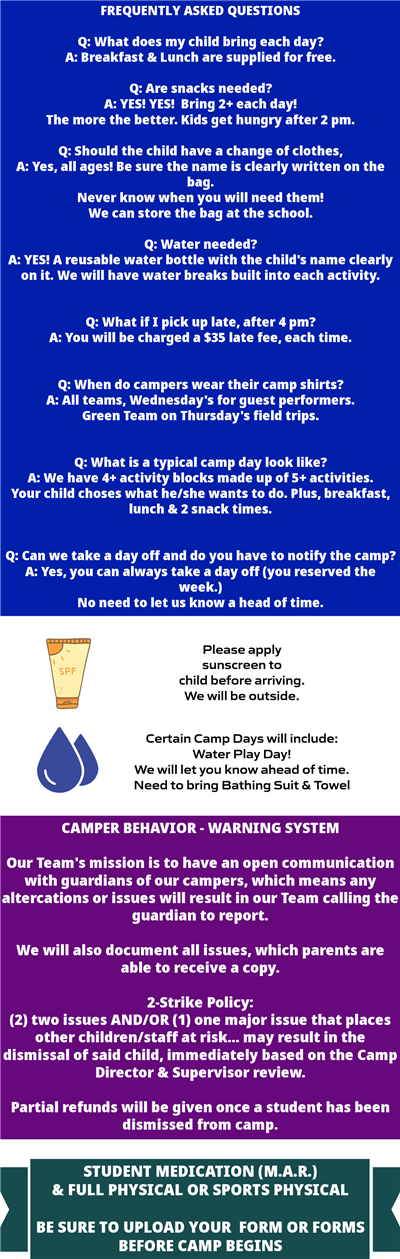
Also, if your child is using an inhaler or taking medication at camp... then you must have your Doctor fill out the M.A.R. form (download it at the bottom of this page.HOW TO UPLOAD PHYSICAL AND/OR M.A.R. FORM?Simply LOGIN to your "Household Account"Then click on Members > Member's Name > "Add New Member Document"That's it!Please, this needs to be done before camp starts.We will have a few inspections by OEC which these documents are required.
(Need Help? Scroll to bottom of this page for step by step instructions)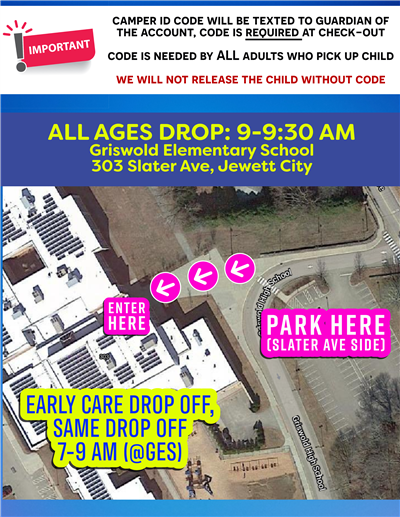
___________________________________________________Camp AdministrationRyan Aubin - Town Directorrecdirector@griswold-ct.orgRebecca Teczar: Assistant Town Directorrecassistant@griswold-ct.orgRyan Pelillo: Summer Camp Director___________________________________________________STILL HAVING TROUBLE UPLOADING YOUR DOCUMENTS?
STEP ONE:Go To Your Household AccountThen Click MembersThen Click the Member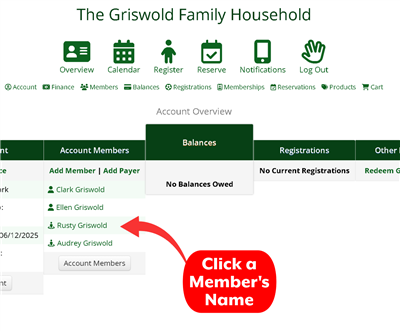 STEP TWO:Upload Your Document(this will be at the bottom of your Member's page)
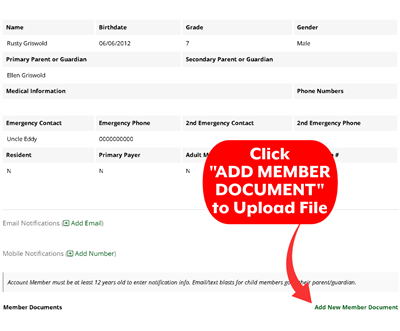 Still having issues?Email it to: recdirector@griswold-ct.org
Ryan will upload it for you.